

Did you know a tornado formed the year you were born?
Not a real one. A data one.
Type your birth year. Watch the storm react - the speed, the color, the rage of it - all driven by the exact CO₂ levels recorded that year.
🌪️Live Site - https://thedatatornado.figma.site
🎨Figma Make - https://www.figma.com/make/onDJsdMQ3PQV2B8xkSzHKn/TheDataTornado (https://www.figma.com/make/onDJsdMQ3PQV2B8xkSzHKn/TheDataTornado?t=AdZGoKLchp7v8avG-1)
📋FigJam Board - https://www.figma.com/board/2P5FGzsc6faOl2a2JK2GDo/TheDataTornado (https://www.figma.com/board/2P5FGzsc6faOl2a2JK2GDo/TheDataTornado?node-id=0-1&t=fECFM44dgxDR2x3C-1)
💻GitHub Repo - https://github.com/isumenuka/Thedatatornado
🔬 The Problem
Climate change is the most documented crisis in human history. Scientists have been collecting data for over 65 years. But most people feel nothing when they see the numbers - because a wall of data doesn't make you care. That is a design problem. The Data Tornado is my answer.
⚙️ How It Was Built
I started in FigJam - mapping the full app structure, severity color system (Stable → Elevated → Critical → Extreme), and the 65-year climate timeline before touching any build tool.
In Figma Make, I loaded my complete design guidelines first - colors, fonts, spacing rules - so every generated output matched my vision from the first prompt. That one step eliminated hours of corrections.
The MCP connector was the most critical technical piece: a custom live pipeline to NOAA's servers, pulling real CO₂ and temperature readings automatically every time someone opens the app. No downloading. No pasting. Always live.
The hero background video was generated entirely in Figma Weave - I set a start frame and end frame, and Weave generated the full atmospheric storm footage between them. The Figma Agent handled precision edits throughout -clicking directly on individual elements, repositioning buttons, aligning sections, without touching anything else.
Supabase powers the share cards, news gallery, and live data caching. GitHub handles deployment.
🛠️ Tools Used
→ FigJam: full app structure, severity system & data flow diagrams
→ Figma Make: prompt-to-code app with custom NOAA MCP connector
→ Figma MCP: live pipeline direct to NOAA's climate API
→ Figma Weave: AI video generation for the hero storm background
→ Figma Agent: precision element-level UI edits throughout the build
→ Supabase: backend for share cards, news & data caching
→ GitHub: deployment and version control
✨ Key Feature - Birth Year Telemetry
Enter your birth year. The app instantly generates your personal climate log -the exact CO₂ concentration the year you arrived in the world, your temperature anomaly then vs. now, your severity level at birth vs. today. It stops being a global statistic. It becomes yours.
Most people go quiet when they see their own number.
61
78
3.8K
SimpleRent - Contra Submission Post
Google Stitch Challenge Entry
PROJECT LINK
https://stitch.withgoogle.com/projects/14459373944360524996
(https://stitch.withgoogle.com/projects/14459373944360524996)WEBAPP LINK
https://simple-rent-contra.vercel.app (https://simple-rent-contra.vercel.app/)
PROJECT TITLE
SimpleRent - Student Rental Platform for Sri Lanka
Every year, university students in Sri Lanka leave their hometowns to study in Colombo. They arrive with no local knowledge and no housing plan. No platform was built specifically for them.
SimpleRent is a student-first rental interface that solves two linked problems in one product: find a safe rental near your campus or find a compatible roommate to share the cost.
Google Maps-centered property search, NIC verification flow, roommate board, landlord dashboard, multi-step onboarding, messaging interface, and more - entirely designed and iterated inside Google Stitch.
HOW I USED STITCH
Before generating a single screen, I designed my own logo - a map pin housing a rooftop icon - and imported it into Stitch to generate a design.md (http://design.md) brand file. Stitch scanned the logo and produced a complete design system: color palette, typography, card radius, shadow depth, and spacing. Every screen inherited that system automatically from the start.
Each of the 18 screens was then streamed live to the canvas - letting me review and plan refinements on one screen while the next was still being generated.
Once screens were on the canvas, I used Stitch's in-place AI edit feature to refine specific elements without regenerating anything. I clicked directly on a footer, typed a prompt, and only the footer changed. Same for card layouts, button colors, and badge styling - precise, targeted iteration on exactly the element I chose.
For motion, I used Stitch's native HTML canvas to build the NIC verification animation: the ID card shakes first as a visual cue, then flips smoothly on double-click. Property cards lift and shadow on hover. Because Stitch renders native HTML by default, every animation played in real time directly on the canvas as I built it.
For the code pipeline, I used Stitch's MCP connection to import Antigravity. Antigravity handled the code-side refinements - the logic and structure that go beyond what a visual canvas touches. Stitch for design. Antigravity for code. A full design-to-code pipeline, linked through MCP.
FEEDBACK ON STITCH
The real-time streaming canvas changed how I design. You stop waiting for a result and start collaborating with it - refining the previous screen while the next one is still being generated. That shift alone made the process feel genuinely different from any other tool I have used.
The in-place edit feature removed the biggest frustration of AI design tools: the fear of regenerating something good just to fix something small. Clicking directly on an element and prompting only that element to change is the kind of control that makes iteration feel safe.
The MCP integration with Antigravity was the unexpected part. It bridges the gap between a design prototype and a real codebase in a way I did not expect from a design tool.
Stitch did not just speed up how I work. It improved the ideas I had while I was working.
4
15
757
🌍 Introducing my ElevenCreative Template — a fully automated country-based video generation workflow!
Pick a country. Add your location. Drop in two faces (male + female). Hit run.
From there, EVERYTHING is auto-generated:
🎵 Country-matched background music
🗣️ Welcome narration spoken in the local language
💃 Culturally matched poses and expressions
🎬 Smooth video transitions — start to finish
No editing. No dubbing. No multi-tool juggling. One pipeline, one click, one complete video.
This template chains image generation, lip-sync, TTS, and music models inside ElevenCreative Flows — replacing a workflow that would normally take hours across multiple tools and platforms.
🔗 Try the template here → https://elevenlabs.io/app/templates/JLcakgDoamRbKLgR78q7
@ElevenCreative #ElevenCreative
1
8
506
THE LAST NODE — A Complete AI-Generated Graphic Novel
Built entirely on Melius
What I Built:
365 nodes on one Melius canvas
20 story pages across 5 chapters
57+ individually generated panels
3 full-page cinematic splash panels
Complete front and back cover
Character sheets, environment sheets, prop sheets — all locked for consistency
How I Built It:
I used Melius chat to automatically generate the node structure from my story idea. Then I wired character reference nodes, environment reference nodes, and prop nodes into every single image generation node — so Kael's face, his red jacket, and Cipher's green LED stayed consistent across all 57 panels. Every page runs through its own chain: prompt node → Nano Banana Pro art generation → overlay → assembly. All nodes ran without a single crash or freeze.
Read the full graphic novel:
🔗 https://melius.isumenuka.me/
Explore the full Melius canvas:
🔗 https://app.melius.com/projects/34dbc88b-ddef-411b-98f4-3a63f19527dc/canvas/1aca8142-094c-4e8c-8bfd-55a5911bf83a
Demo video and workflow screenshots attached above.
1
13
642
🎙️ I just built an AI Podcast Video Workflow on @Morphic
that turns ONE image into a full cinematic podcast video automatically.
Here's what it does:
✅ Generates your podcast scene
✅ Creates cinematic B-roll cutaways
✅ Lip-syncs your character to your voice
✅ Alternates camera angles automatically
✅ Adds background music & sound effects
No camera. No studio. No editing skills.
Just one image. One script. One click. 🚀
Try it yourself 👇
https://www.morphic.com/en/workflows/019d963f-181f-76c4-ac88-ff0beae68ec7/podcast-face-reborn
#MorphicWorkflowChallenge @Morphic
4
16
747
Stop chasing your dog with a party hat! 🐶🎂
The Story:
Every pet owner knows the struggle - you want that perfect birthday photo, but your pet won’t sit still, balloons keep popping, and the cake disappears before you even take the shot. This is exactly why I built the Pet Birthday Photoshoot Generator in FLORA.
The Workflow:
This technique transforms a complex creative process into a single click. It automatically generates studio-quality birthday photos using multiple camera angles - dramatic low shots, clean eye-level portraits, and aesthetic top-down flat lays - while maintaining consistent themes, lighting, and composition.
Smart Pet Analysis:
When you upload your pet image, the system intelligently analyzes key details such as:
Fur color and patterns
Pet size and proportions
Eye color
Breed/type characteristics
Overall appearance and vibe
Based on this analysis, it automatically generates perfectly matched:
Birthday cake design (color, size, style)
Party hat and accessories
Neck bands / bows
Background themes and decorations
Everything is customized to fit your pet naturally—so every photo looks realistic, styled, and professionally shot.
Try it yourself:
🔗 https://app.flora.ai/techniques/pet-birthday-photoshoot-generator
Built with @FLORA 🌸
#FLORATechnique
11
30
2.4K
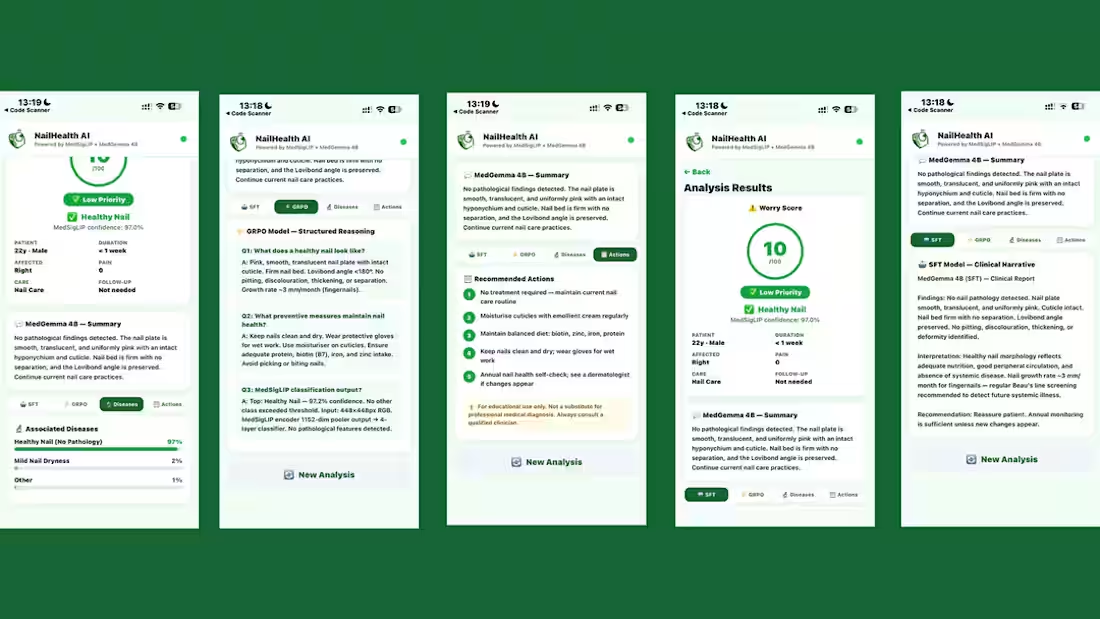
NailHealth AI uses Google's Health AI Developer Foundations (HAI-DEF) models to detect serious diseases through nail signs captured via smartphone camera. The app provides instant clinical explanations and disease predictions.
1
136
This project aims to develop an integrated web application that leverages machine learning models to provide early, multi-disease risk assessment for Non-Communicable Diseases (NCDs). The system focuses on four major NCDs
0
126
MindRoots is an interactive, voice-driven web application powered by Google's Gemini 2.5 Flash Native Audio Preview and the new Gemini Multimodal Live API. It leverages advanced conversational AI to act as a responsive, real-time agent that can see, hear, and speak with users, dynamically maintaining affective dialog and providing mental frameworks/belief trees.
0
105